Automation | Cloud | DevOps | Containers | OpenShift | Kubernates | GCP | Linux

Basics of Architecture, OS and Tool Sets

Friday, April 27, 2018

Optimize cost efficiency on AWS in 7 ways

There are four reasons to explain how using AWS can change the economic model of the IT services that run your applications & workloads:
  1. By running your application in AWS cloud, you substitute traditional up-front capital expenses with a low variable cost model.
  2. AWS operates at a significant scale by virtue of the large number of customers that support their workloads.The economies of scale is continuously used to reduce costs and customers benefit from these cost savings.
  3. AWS services are adaptable. You are not forced to use resources on the OnDemand PAYG model. You only pay for the individual services you need, for as long as you use them and the capacity you require for your workload can also be reserved.
  4. Resources are available in AWS to save money as your workload gets larger. An example is Amazon S3 which is an object-based, simple key-value storage. S3 gives you lower prices based on frequent usage of the service. When you hit a specific volume, the cost per gigabyte reduces.
When you are building your system, you need to investigate and control the economy of your architecture. Think of a model where extensive changes are possible, driven by economics and the availability of new AWS services. Explore and take advantage of all the opportunities for optimizing costs that exist in AWS.
The seven ways to optimize for cost efficiency in AWS are:
1) Control Provisioned AWS Resources
It is crucial to emphasize the importance of controlling provisioned AWS resources. Think carefully about the individuals you allow to turn services on. Best practice is to have a group of owners who control the provisioning of resources for various departments via IAM. Provide tools to each team to make them autonomous on their cost optimization.To optimize cost, shut down test instances at the end of each working day and on weekends. You can also run workloads into docker containers and quickly spin them on the new Elastic Compute Cloud (EC2) container service. Use Dev/Ops Tools like AWS Opworks and Elastic Beanstalk to quickly deploy applications without having to worry about the underlying infrastructure. Lastly, use AWS CloudFormation to create resource templates of your AWS resources to build your environments quickly.
2) Make use of the Appropriate Storage Classes
The 5 storage classes tiers available in AWS are S3, S3-IA (Infrequently Access), S3 One Zone-IA, Reduced Redundancy Storage (RRS) and Glacier.
If an object is less than 128kb, Amazon S3 charges you for 128kb. The cost putting a file on S3 can be broken down into the actual storage cost, cost of the HTTP PUT requests, cost of the HTTP GET requests and the cost of the data transfer. 
Take advantage of S3-IA for data that is accessed less frequently, but requires rapid access when needed. S3-IA’s fee is lower than S3 but you are charged a retrieval fee.
Just like S3-IA, One Zone-IA is also designed for long-lived but less frequently accessed data and you are charged for a minimum storage duration of 30 days. The differences are One Zone-IA is less expensive and stores objects in only one Availability Zone (AZ). Objects stored in One Zone-IA are not resilient to the physical loss of the AZ.
RRS is designed to provide 99.99% durability and 99.99% availability of objects over a given year. RRS is designed for data that is easily reproducible such as thumbnails. Store images in a bucket and the thumbnails in RRS so if the file is missing you can regenerate the thumbnails.
Amazon Glacier is great for archiving of long-term backups of cold or old data. Glacier is just as durable as S3 but the tradeoff is that it takes 3-5 hours to restore data. Glacier Storage Class is designed for data that is retained for more than 90 days.
Lastly, implement object lifecycle management to manage your objects so that they are stored in a cost-effective manner. For object lifecycle management, you can choose to transition objects to S3-IA or One Zone-IA 30 days after the creation date or archive to Glacier Storage Class or simply set up a delete policy where S3 should delete expired objects on your behalf.
3) Select the Right Instance Type
It is important to ensure that you are using the most cost-effective instances because different instance families cost different amounts. Select the instance that best suits your application workload. Consider factors like virtual central processing unit, ideal use case and memory to optimize the amount of money you spend. It is recommended that at least twice a year, there is an assessment of your instance choice to ensure they match the reality of your workload. Optimize around the particular instance resource which would result in the delivery of best price performance.
Tagging of instances are imperative. The cost per hour of running systems can be monitored in real time, calculated using tags and these results can drive the development team to optimize costs. To enforce discipline on tagging in your organization, you can set up a “No tags? No instance” policy where instances without a tag are stopped. You can create a script that shuts down instances that are not tagged but please be extremely cautious.
4) Monitor, Track, and Analyze your Services Usage
Trusted Advisor and CloudWatch are monitoring and management tools to access your instance metrics. Based on your assessment you can scale your instance size up or down. Trusted Advisor is an excellent tool because it identifies idle resources by running configuration checks.Trusted Advisor provides real-time guidance to help you provision your resources following AWS best practices. With Trusted Advisor, stay up-to-date with your AWS resource deployment by getting weekly updates to increase security and performance and reduce your overall costs. You can also create alerts, monitor service limits and automate actions with Cloudwatch.
Match resources to your workload by using AWS Cloudwatch to gain system-wide visibility and keep your application running smoothly. Cloudwatch can be used to set alarms, collect & monitor log files, and automatically react to changes in your resources like operational health. With Amazon Cloudwatch, you can also monitor custom metrics generated by your own applications via a simple API by sending and storing metrics that are important to your application’s operational performance. Turn off non-production instances and use Amazon CloudWatch and Auto Scaling to match demand.
5) Use Auto Scaling
It is important to align your resources with demand. To handle demand or sudden traffic spikes, you can simply design dynamically for capacity by using Auto Scaling to add resources only when required and equally turns them off when not. The benefit of including Auto Scaling to your application’s architecture isn’t just limited to better cost management, it enables you to detect when an instance is unhealthy, terminate it and relaunch another.
To set up Auto Scaling, you need:
  • A launch configuration where you describe what Auto Scaling will create when adding instances.
  • Configure your Auto Scaling group and define the AZs that you wish to create the instances into. Set the maximum and minimum size of the group to automatically scale the number of instances.
  • Set up an Auto Scaling policy where parameters for performing an Auto Scaling action are defined. Define a cool-down period to prevent the addition of large amounts of capacity. For a scale-up policy, you can add an instance to respond to a particular event.
6) Consolidated Billing
Consolidated Billing enables you to see a combined view of all AWS charges incurred by all your accounts i.e. you get one bill for multiple AWS accounts. Consolidated billing is available at no additional charge and one account is usually designated the Master Account. The Master Account pays the charges that are accumulated by all the other accounts in the consolidated billing family. Each account charges can be easily tracked and the cost data can also be downloaded in CSV format.
An example:
Let’s consider 2 AWS accounts named Alice and Eve.
Alice transfers 8TB of data and Eve transfers 6TB.
Alice’s consolidated bill consists of Eve’s account and her own account.
The master account is Alice’s account because she pays for the charges incurred by herself and Eve.
If AWS charges $0.19 per GB for the first 10 TB of data transferred, $0.15 for the next 40 TB.
To calculate for the first 10TB;
0.19*1024 = $194.56
To calculate for the next 40TB;                                                                     {1TB=1024GB}
0.15*1024 = $153.60
For the 14TB that Alice and Eve used, Alice (Master account) is charged:
($194.56 * 10TB) + ($153.60 * 4TB)
=$1945.6 + $614.4 = $2560
The average cost-per-unit of data transfer for the month is therefore=$2560/14TB=$182.86 per TB. This average rate is shown on the Bills Page and can be downloaded as a cost report for each account listed in the consolidated bill.
Without Consolidated Billing, AWS would have charged Alice and Eve each $194.75 per TB for their usage. A total of ($194.75* 14) = $2726.50.
Total Cost Savings with Consolidated Billing = ($2726.50 - $2560)= $166.50  
7) Use Reserved and Spot Instances
Commitment by using Reserved Instances (RI) would provide some dollar savings. With Reserved Instances, you can save up to 75% over equivalent on-demand capacity. If you buy a RI and you don’t need it, you can easily sell it back or buy a shorter duration RI in the reserved instance marketplace. Reservations come with three different payment options: Full Upfront, Partial Upfront, and No Upfront. With partial and no upfront, you pay the remaining balance monthly over the term. Apart from Reserved Instances, Amazon RDS, Dynamo DB, Redshift and Elastic Cache are other services where you can take advantage of reservation.
Spot Instances are a phenomenal way to save money for non-stateful workloads, simply bid on EC2 capacity which is not currently in use. Spot Instances are ideal for workloads where you need access to large amounts of compute capacity but you are not concerned about an interruption because you have a mechanism for dealing with the interruption. The prices of Spot Instances vary overtime on the bases of current demand. 

Cost Explorer, Billing Dashboard, Detailed Billing Report are additional examples of excellent AWS’s tools that can be used to determine your daily spend and maintain a strict billing hygiene. You can also build your own monitoring solution by developing a Lambda function that ingests detailed billing file into Redshift. Always remember that you are not only charged for data transfer to the Internet but also between AZs, so instances that communicate with each other should be located in the same AZ.
KEY TAKEAWAYS
  1. The simplest way to save money on AWS is not to use services that you don’t need and to investigate your unused infrastructure
  2. Always select the right instance type
  3. Optimize your S3 consumption and make use of the appropriate S3 storage class
  4. Use Cloudwatch and Trusted Advisor to monitor your daily costs
  5. Use Auto Scaling to align your resources with demand
  6. Benefit from cost savings by using Consolidated Billing
  7. Use Reserved and Spot Instances
on April 27, 2018 No comments:
Email ThisBlogThis!Share to XShare to FacebookShare to Pinterest

Wednesday, January 3, 2018

Best Practices: Optimizing the Number of Application Servers

Best Practices: Optimizing the Number of Application Servers

A production stack commonly includes multiple application servers distributed across multiple Availability Zones. However the number of incoming requests can vary substantially depending on time of day or day of the week. You could just run enough servers to handle the maximum anticipated load, but then much of the time you will end up paying for more server capacity than you need. To run your site efficiently, the recommended practice is to match the number of servers to the current request volume.
AWS OpsWorks Stacks provides three ways to manage the number of server instances.
  • 24/7 instances are started manually and run until they are manually stopped.
  • Time-based instances are automatically started and stopped by AWS OpsWorks Stacks on a user-specified schedule.
  • Load-based instances are automatically started and stopped by AWS OpsWorks Stacks when they cross a threshold for a user-specified load metric such as CPU or memory utilization.
Note
After you have created and configured your stack's time and load-based instances, AWS OpsWorks Stacks automatically starts and stops them based on the specified configuration. You don't have to touch them again unless you decide to change the configuration or number of instances.
Recommendation: If you are managing stacks with more than a few application server instances, we recommend using a mix of all three instance types. The following is an example of how to manage a stack's server capacity to handle a variable daily request volume with the following characteristics.
  • The average request volume varies sinusoidally over the day.
  • The minimum average request volume requires five application server instances.
  • The maximum average request volume requires sixteen application server instances.
  • Spikes in request volume can usually be handled by one or two application server instances.
This is a convenient model for the purposes of discussion, but you can easily adapt it to any variation in request volume and also extend it to handle weekly variations. The following diagram shows how to use the three instance types to manage this request volume.
This example has the following characteristics:
  • The stack has three 24/7 instances, which are always on and handle the base load.
  • The stack has 12 time-based instances, which are configured to handle the average daily variation.
    One runs from 10 PM to 2 AM, two more run from 8 PM to 10 PM and 2 AM to 4 AM, and so on. For simplicity, the diagram modifies the number of time-based instances every two hours, but you can modify the number every hour if you want finer-grained control.
  • The stack has enough load-based instances to handle traffic spikes that exceed what can be handled by the 24/7 and time-based instances.
    AWS OpsWorks Stacks starts load-based instances only when the load across all of the currently running servers exceeds the specified metrics. The cost for nonrunning instances is minimal (Amazon EBS-backed instances) or nothing (instance store-backed instances), so the recommended practice is to create enough of them to comfortably handle your maximum anticipated request volumes. For this example, the stack should have at least three load-based instances.
Note
Make sure you have all three instance types distributed across multiple Availability Zones to mitigate the impact of any service disruptions.
on January 03, 2018 No comments:
Email ThisBlogThis!Share to XShare to FacebookShare to Pinterest
Labels: application deployment, AWS, CI/CD, cloud, deployment, EC2, migration

Tuesday, January 2, 2018


Big data architecture style


In this article

  1. When to use this architecture
  2. Benefits
  3. Challenges
  4. Best practices
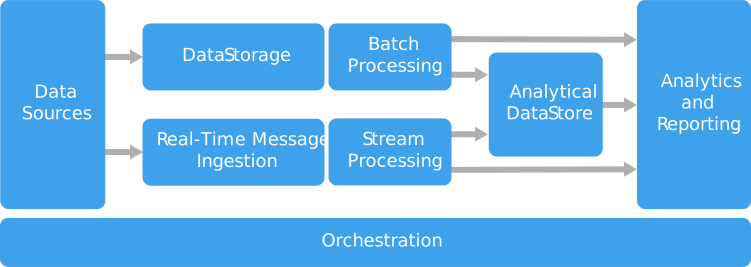
A big data architecture is designed to handle the ingestion, processing, and analysis of data that is too large or complex for traditional database systems.
Big data solutions typically involve one or more of the following types of workload:
  • Batch processing of big data sources at rest.
  • Real-time processing of big data in motion.
  • Interactive exploration of big data.
  • Predictive analytics and machine learning.
Most big data architectures include some or all of the following components:
  • Data sources: All big data solutions start with one or more data sources. Examples include:
    • Application data stores, such as relational databases.
    • Static files produced by applications, such as web server log files.
    • Real-time data sources, such as IoT devices.
  • Data storage: Data for batch processing operations is typically stored in a distributed file store that can hold high volumes of large files in various formats. This kind of store is often called a data lake. Options for implementing this storage include Azure Data Lake Store or blob containers in Azure Storage.
  • Batch processing: Because the data sets are so large, often a big data solution must process data files using long-running batch jobs to filter, aggregate, and otherwise prepare the data for analysis. Usually these jobs involve reading source files, processing them, and writing the output to new files. Options include running U-SQL jobs in Azure Data Lake Analytics, using Hive, Pig, or custom Map/Reduce jobs in an HDInsight Hadoop cluster, or using Java, Scala, or Python programs in an HDInsight Spark cluster.
  • Real-time message ingestion: If the solution includes real-time sources, the architecture must include a way to capture and store real-time messages for stream processing. This might be a simple data store, where incoming messages are dropped into a folder for processing. However, many solutions need a message ingestion store to act as a buffer for messages, and to support scale-out processing, reliable delivery, and other message queuing semantics. Options include Azure Event Hubs, Azure IoT Hubs, and Kafka.
  • Stream processing: After capturing real-time messages, the solution must process them by filtering, aggregating, and otherwise preparing the data for analysis. The processed stream data is then written to an output sink. Azure Stream Analytics provides a managed stream processing service based on perpetually running SQL queries that operate on unbounded streams. You can also use open source Apache streaming technologies like Storm and Spark Streaming in an HDInsight cluster.
  • Analytical data store: Many big data solutions prepare data for analysis and then serve the processed data in a structured format that can be queried using analytical tools. The analytical data store used to serve these queries can be a Kimball-style relational data warehouse, as seen in most traditional business intelligence (BI) solutions. Alternatively, the data could be presented through a low-latency NoSQL technology such as HBase, or an interactive Hive database that provides a metadata abstraction over data files in the distributed data store. Azure SQL Data Warehouse provides a managed service for large-scale, cloud-based data warehousing. HDInsight supports Interactive Hive, HBase, and Spark SQL, which can also be used to serve data for analysis.
  • Analysis and reporting: The goal of most big data solutions is to provide insights into the data through analysis and reporting. To empower users to analyze the data, the architecture may include a data modeling layer, such as a multidimensional OLAP cube or tabular data model in Azure Analysis Services. It might also support self-service BI, using the modeling and visualization technologies in Microsoft Power BI or Microsoft Excel. Analysis and reporting can also take the form of interactive data exploration by data scientists or data analysts. For these scenarios, many Azure services support analytical notebooks, such as Jupyter, enabling these users to leverage their existing skills with Python or R. For large-scale data exploration, you can use Microsoft R Server, either standalone or with Spark.
  • Orchestration: Most big data solutions consist of repeated data processing operations, encapsulated in workflows, that transform source data, move data between multiple sources and sinks, load the processed data into an analytical data store, or push the results straight to a report or dashboard. To automate these workflows, you can use an orchestration technology such Azure Data Factory or Apache Oozie and Sqoop.
Azure includes many services that can be used in a big data architecture. They fall roughly into two categories:
  • Managed services, including Azure Data Lake Store, Azure Data Lake Analytics, Azure Data Warehouse, Azure Stream Analytics, Azure Event Hub, Azure IoT Hub, and Azure Data Factory.
  • Open source technologies based on the Apache Hadoop platform, including HDFS, HBase, Hive, Pig, Spark, Storm, Oozie, Sqoop, and Kafka. These technologies are available on Azure in the Azure HDInsight service.
These options are not mutually exclusive, and many solutions combine open source technologies with Azure services.

When to use this architecture

Consider this architecture style when you need to:
  • Store and process data in volumes too large for a traditional database.
  • Transform unstructured data for analysis and reporting.
  • Capture, process, and analyze unbounded streams of data in real time, or with low latency.
  • Use Azure Machine Learning or Microsoft Cognitive Services.

Benefits

  • Technology choices. You can mix and match Azure managed services and Apache technologies in HDInsight clusters, to capitalize on existing skills or technology investments.
  • Performance through parallelism. Big data solutions take advantage of parallelism, enabling high-performance solutions that scale to large volumes of data.
  • Elastic scale. All of the components in the big data architecture support scale-out provisioning, so that you can adjust your solution to small or large workloads, and pay only for the resources that you use.
  • Interoperability with existing solutions. The components of the big data architecture are also used for IoT processing and enterprise BI solutions, enabling you to create an integrated solution across data workloads.

Challenges

  • Complexity. Big data solutions can be extremely complex, with numerous components to handle data ingestion from multiple data sources. It can be challenging to build, test, and troubleshoot big data processes. Moreover, there may be a large number of configuration settings across multiple systems that must be used in order to optimize performance.
  • Skillset. Many big data technologies are highly specialized, and use frameworks and languages that are not typical of more general application architectures. On the other hand, big data technologies are evolving new APIs that build on more established languages. For example, the U-SQL language in Azure Data Lake Analytics is based on a combination of Transact-SQL and C#. Similarly, SQL-based APIs are available for Hive, HBase, and Spark.
  • Technology maturity. Many of the technologies used in big data are evolving. While core Hadoop technologies such as Hive and Pig have stabilized, emerging technologies such as Spark introduce extensive changes and enhancements with each new release. Managed services such as Azure Data Lake Analytics and Azure Data Factory are relatively young, compared with other Azure services, and will likely evolve over time.
  • Security. Big data solutions usually rely on storing all static data in a centralized data lake. Securing access to this data can be challenging, especially when the data must be ingested and consumed by multiple applications and platforms.

Best practices

  • Leverage parallelism. Most big data processing technologies distribute the workload across multiple processing units. This requires that static data files are created and stored in a splittable format. Distributed file systems such as HDFS can optimize read and write performance, and the actual processing is performed by multiple cluster nodes in parallel, which reduces overall job times.
  • Partition data. Batch processing usually happens on a recurring schedule — for example, weekly or monthly. Partition data files, and data structures such as tables, based on temporal periods that match the processing schedule. That simplifies data ingestion and job scheduling, and makes it easier to troubleshoot failures. Also, partitioning tables that are used in Hive, U-SQL, or SQL queries can significantly improve query performance.
  • Apply schema-on-read semantics. Using a data lake lets you to combine storage for files in multiple formats, whether structured, semi-structured, or unstructured. Use schema-on-read semantics, which project a schema onto the data when the data is processing, not when the data is stored. This builds flexibility into the solution, and prevents bottlenecks during data ingestion caused by data validation and type checking.
  • Process data in-place. Traditional BI solutions often use an extract, transform, and load (ETL) process to move data into a data warehouse. With larger volumes data, and a greater variety of formats, big data solutions generally use variations of ETL, such as transform, extract, and load (TEL). With this approach, the data is processed within the distributed data store, transforming it to the required structure, before moving the transformed data into an analytical data store.
  • Balance utilization and time costs. For batch processing jobs, it's important to consider two factors: The per-unit cost of the compute nodes, and the per-minute cost of using those nodes to complete the job. For example, a batch job may take eight hours with four cluster nodes. However, it might turn out that the job uses all four nodes only during the first two hours, and after that, only two nodes are required. In that case, running the entire job on two nodes would increase the total job time, but would not double it, so the total cost would be less. In some business scenarios, a longer processing time may be preferable to the higher cost of using under-utilized cluster resources.
  • Separate cluster resources. When deploying HDInsight clusters, you will normally achieve better performance by provisioning separate cluster resources for each type of workload. For example, although Spark clusters include Hive, if you need to perform extensive processing with both Hive and Spark, you should consider deploying separate dedicated Spark and Hadoop clusters. Similarly, if you are using HBase and Storm for low latency stream processing and Hive for batch processing, consider separate clusters for Storm, HBase, and Hadoop.
  • Orchestrate data ingestion. In some cases, existing business applications may write data files for batch processing directly into Azure storage blob containers, where they can be consumed by HDInsight or Azure Data Lake Analytics. However, you will often need to orchestrate the ingestion of data from on-premises or external data sources into the data lake. Use an orchestration workflow or pipeline, such as those supported by Azure Data Factory or Oozie, to achieve this in a predictable and centrally manageable fashion.
  • Scrub sensitive data early. The data ingestion workflow should scrub sensitive data early in the process, to avoid storing it in the data lake.
  • +
on January 02, 2018 No comments:
Email ThisBlogThis!Share to XShare to FacebookShare to Pinterest

Deployment and Release Strategies & Best Practices in Cloud

Application Deployment and Release Strategies & Best Practices


In this article we’ll be covering various options and considerations for deploying code and releasing features. We’ll discuss patterns for deploying to a fixed set of servers as well as variations where multiple groups of servers can be utilized. We’ll wrap up with strategies for releasing features to targeted groups of users.
While some of the strategies provide better capabilities than others, this is not meant to be a review or comparison, but rather a guide to the options at hand. Every situation is unique and may require a different implementation based on the constraints at hand.

  • Single Server Group Deployments

In many situations you may have a set of dedicated servers running your application. This may be a traditional data center setting where procuring servers is difficult, or maybe deployment to devices in the field, such as point of sale, or any other case where you need to deploy to a fixed set of servers in place.

  1. Highlander: 

The most traditional deployment patten is the Highlander strategy. In this pattern all instances running a version of an application are upgraded to the new version at the same time. This is common for apps that don’t require significant uptime such as lower life cycle development servers, or hobby applications.
This is simple but high risk strategy that will impact all users not only in the event of a failure but as part of the deployment itself. Even with a successful deploy, the servers will need to stop taking traffic when switching to the new code.

2. Canary Deployment: 

A safer pattern than Highlander the Canary deployment that deploys to only a small portion of the available servers. This pattern allows the new code to be introduced into a live environment and monitored for any abhorrent behavior. Any issues with the code or deployment are limited to a smaller set of users.
While this patten does provide a safer option, having multiple versions running for a length of time brings its own set of challenges ranging from operations to user facing.

3. Rolling Deploy:

This is safest so far, limiting user downtime and impact, but requires more sophisticated deployment tooling.

The rolling deploy is simply the continuation of the canary deploy. In this case you would update one server after another until your whole bank of servers has been upgraded.

  • Multiple Server Group Deployments

With the adoption of virtualization and cloud computing, the need to limit ourselves to a fixed set of servers is gone. Instead we can spin up while new sets of servers whenever we choose.
This helps enable a deployment best practice where you separate your deployment from the release or usage of the deployment. For example with multiple server groups you can deploy to a new set of servers but never activate it to receive user traffic.

1. Blue / Green

The Blue/Green pattern (or Red/Black depending on your camp) is the Highlander patten for multiple server groups. In this strategy a new server group with the new version of code is stood up with no traffic. Once all the servers are ready, all the traffic is directed to the new bank of servers.
This technique allows rapid rollback in the event of a failure since we’ve remove the deployment from the equation and are only directing traffic to one version or the other.
While this is a great example of separating the deploy from traffic and while it provides rapid rollback, this is still an all or nothing switch.
As with the Highlander strategy all users are impacted during the switch. Even though we don’t need to deploy the code, often times applications have a bit of startup time where connections are built, and objects are cached which will impact users.

2. Canary with two groups

The Canary deploy with multiple groups works very similar to the Canary in a single group. The main difference is that we’ve separated the deploy from the traffic.
The most straight forward way is to introduce a new group with one server and add the group to the load balancer. If you had three servers for version one, adding this would introduce a fourth server and direct a quarter of the traffic to the new instance.
This allows you to monitor the new code under live conditions before serving it to all your users.
A variation depending on your capabilities would be to deploy three new servers with the new version and spray a small prevent of all traffic to the new servers. This allows more fine grained control over how many of the users are impacted and provides a warmup period for all the new servers.

3. Rolling Deploy with two groups

Again as with the single group patterns the rolling deploy for multiple groups is just a continuation of the Canary deploy. We deploy our code and servers in one step then add traffic separately.
Here though we have to add a new technique. As we continue to add servers to the mix, we’ll need to take servers out of rotation on the old group.
This would be an ideal strategy for a CI/CD stack where robust health checking and operational monitoring allow code to automatically roll live.

Feature Release Strategies

Much of the focus with deployment strategies is on the act of putting code into the environment. We’ve talk briefly about patterns that separate the deployment from the user traffic but those were still focused on the code.
Multiple issues can crop up when focusing only on the code. User sessions may be dropped mid stream, users may see V1 of a page on one click, then see V2 on refresh and back to V1 on yet another refresh.
In this section we’ll review strategies targeted toward the user experience.

Environment Separation

The most basic pattern for providing a consistent user experience and testing new code is to build a new environment or site. You may offer your users an option to try out the new site at http://beta.yourcompany.com. You might use this for a huge new design review or as part of your regular process where every code deploy goes to beta for a time before moving to production.
The clean separation allows for simple management and clear operation.

Feature Toggles

Feature toggles are a technique where both versions of your feature are included in the same code base, but are surrounded by logic to execute on or the other based on external factors such as a property value or database switch.
This is a useful technique to separate the deploy from usage in any setup, multiple server groups, single group and legacy monoliths.
Ideally these are more dynamic in nature, managed by a backend datastore. Operators would toggle a feature on or off by updating the setting in the database not by deploying code or manipulating traffic.
This also acts as a safety shutoff in case some external dependency or service provider starts to impact your site, just flick the switch and shut off the feature that uses them.

User Targeted Testing

Feature toggles are useful but by default they’re all or nothing and don’t provide the ability to test a new feature for a group of users.
Small enhancements to the Toggle pattern allow the switch to be related to users instead of the system as a whole.
For example instead of the toggle using an database on/off value to show version A or B, you might utilize a cookie value. All users with a cookie value ending in an odd number would get one version of the feature while those with an even cookie could get version 2 of the feature.
This technique can be very simple or as complicated as you wish. You might set random cookie and split 50⁄50 as listed above or get more sophisticated and barrack down to smaller percentages. You might also begin to utilize user data such as location to target users on the east coast. You could even tap into the customers profile to target their experience.
Entire companies and products are built around this technique but there is a lot of value in even the simplest implementation.

Conclusion

There are many techniques for deploying code into an environment. Depending on your use case one may fit better than another.
Balancing the technical complexity with the customer impact and overall business needs will ultimately drive which pattern works best for

on January 02, 2018 No comments:
Email ThisBlogThis!Share to XShare to FacebookShare to Pinterest
Labels: application deployment, AWS, CI/CD, cloud, deployment, migration

Thursday, November 30, 2017

Magic Inside Big Data : Real-Time Data Pipelines with Spark, Kafka, and Cassandra

Over the past year, There is significant increase in focus on real-time data and real-time insights. It’s clear that real-time analytics provide the opportunity to make faster (and better) decisions and gain competitive advantage.
Immediate insights into real-time data can help you in several ways, including the ability to:
  • Spot potential opportunities and risks before it’s too late;
  • Tap into data that’s always on (e.g. sensors, machine logs, web logs, connected devices);
  • React quickly to changing conditions (e.g. identify health issues, replace faulty machinery).
For example, if you’re launching an on-line ad campaign, you’ll want to see how the campaign performs by measuring user engagement, ad views, clicks, downloads, purchases and so on. With real-time data, you can tune the knobs for your campaign while those events are happening. If you’re in the health care industry, you can use real-time monitoring information to detect anomalies, provide early warning, and save patients’ lives. And for those in other industries – whether you work for a financial institution, an insurance firm, an airline, or a telephone company – the ability to track and analyze events in real-time can help you make pro-active decisions, eliminate risks, and provide more competitive offers to your customers.
Real-time is quickly becoming the next phase in the evolution of the Big Data industry.
So why isn’t everyone using real-time data today?
Why aren’t more companies doing real-time analytics to stay one step ahead of their competition? To be clear, some are doing it. Large financial institutions have invested a great deal in their own event-processing frameworks specifically designed for their needs – whether for real-time risk analysis or fraud detection. Big Internet companies have built their own solutions to meet the real-time demands of web-scale businesses dealing with massive amounts of data.
But what about all the other enterprises that would benefit from the ability to gain insights and act immediately on events as they happen? In my opinion, there seem to be four issues holding them back:
  • High cost: Until recently, there were no affordable and easy-to-use frameworks for real-time analysis.
  • Missing requirements: The IT teams in these enterprises may not fully understand the business requirements for real-time analytics unless they are clearly articulated as technology requirements.
  • Limited exposure: The business users often don’t realize what technology is available or what’s possible, especially when it comes to analyzing new data streams, until they see it working in practice.
  • Lack of expertise: It can be hard for IT teams to implement new frameworks because these technologies often have a steep learning curve, and most of their existing staff don’t have the expertise to get started.
The first issue has been partly addressed by the development of several new open source frameworks – including some that were developed by big Internet companies that pioneered the use of real-time analytics.
To address the remaining three issues, what I’ve seen work is to provide a way for business users (i.e. business analysts, data professionals, and developers) to get started, experiment, and iterate rapidly. This allows both the business and IT teams to ramp up over time and quickly traverse through a learning cycle (data->analysis->feedback->more/different data->different analysis->feedback) in a continuous manner. In doing so, they can overcome their lack of exposure and expertise with these tools – and fill in their missing use case requirements – for real-time analytics.
Building and scaling real-time data pipelines
These issues are particularly challenging because the technology, tools, and mindset for building real-time data pipelines are different than for traditional data analysis or the large-scale distributed batch processing made popular with Hadoop.
With real-time, you’re not analyzing data that is stored somewhere after the event; you’re analyzing streams of data that are continuous and always on. Systems built for real-time need to have the ability to collect those data streams, process the data quickly, take immediate action, and store the data for continuous analysis. In parallel, the system needs to evaluate the actions taken and update the model if needed in a very short period of time.
From a technology standpoint, this means you need a system that can do the following:
  • Capture data streams coming in high volumes at high velocity. Each message may not be huge in size, but the throughput can be quite substantial.
  • Scale to process these streams and run a transformation/aggregation (or any model) very quickly. At times, you may have to access data from other sources while running a model.
  • Provide quick lookup to processing stage, and persist these messages, at scale.
In my experience working with companies that have tried to build real-time data pipelines, this type of initiative typically starts as someone’s pet project. They may run it on their laptop, on a few virtual machines, or on a public cloud service. I’ve also seen situations where multiple different teams are experimenting with one element of the overall system without a clear view into the end result. The data pipeline may work well for one power user or for a specific use case. But when they try to stitch it all together and build another pipeline, or scale it to serve multiple users and use cases, it can be cumbersome and unwieldy.
In general, this can be a daunting and complex undertaking. The tools and on-premises infrastructure required for this type of system are time-consuming to assemble and most organizations lack the skills to deploy and wire the needed components. It’s hard to get started and even more difficult to scale in a repeatable and consistent way, with support for all stages of the application lifecycle (e.g. development, quality assurance, user acceptance testing). The overall complexity of the deployment sooner or later takes the attention away from the business problems and use cases they are tying to address.
Spark Streaming, Kafka, and Cassandra
As I mentioned previously, there are several open source frameworks and tools now available for real-time analytics. In particular, the combination of Spark Streaming, Kafka, and Cassandra has emerged as a great fit and a good place to start for building real-time data pipelines.
This new trinity of open source frameworks delivers on key requirements for real-time analysis: including high-throughput, low latency, and a stream-processing framework that is extensible to support growing demand. Kafka is a high-throughput, distributed, publish-subscribe messaging system to capture and publish streams of data; Spark Streaming is an extension of the core Spark API that allows you to ingest and process data in real-time from disparate event streams; and Cassandra provides a scalable and resilient operational database for real-time analytics.
However, as I outlined earlier, many organizations don’t have the expertise in-house to stitch together these frameworks and the infrastructure required. And without practical experience in building real-time data pipelines, it can be difficult for business users, data professionals, and their IT counterparts to deploy the system that they need for initial prototyping, development, and a learning cycle of continuous iteration with these tools.
This is where we can help. BlueData just announced a new Real-time Pipeline Accelerator solution specifically designed to help organizations get started quickly with real-time data pipelines. With BlueData’s EPIC software platform (and help from BlueData experts), you can simplify and accelerate the deployment of an on-premises lab environment for Spark Streaming, Kafka, and Cassandra.
It’s the fastest and easiest way to get up and running with a multi-tenant sandbox for building real-time data pipelines. In my experience, even if you’re already using these technologies for real-time analytics in a production environment, having a sandbox environment for development – with the flexibility to upload new libraries and change configurations – can significantly improve productivity.
This new solution addresses the challenges and complexities of building real-time data pipelines in several ways. But as a data scientist, I’m particularly excited about some of these capabilities:
  • With either BlueData’s web-based user interface or command line API, you can spin up instant clusters for Spark, Kafka, and Cassandra (using pre-configured Docker images) in a matter of minutes.
  • You can scale these clusters if and when your use case demands change. You can easily access each cluster from your laptop using the web-based user interface or SSH for the command line interface.
  • You can also use web-based Zeppelin notebooks for your personal workspace and to collaborate with others.
Real-Time Data Pipeline with BlueData
I’ll explain these particular benefits in a little more detail below.
Focus on your real-time use cases and not the infrastructure
Now you can instantly provision an integrated end-to-end data pipeline to “capture streams->analyze (model/score)-> and store”.  As shown in the screenshot below, you can create new clusters for Spark, Kafka, and Cassandra (running in Docker containers) with just a few mouse clicks – without worrying about the inner-workings and infrastructure for these technologies. This helps eliminate the issues around lack of expertise and exposure to these frameworks that I mentioned earlier.
Create a new cluster with BlueData:
create_cluster
The BlueData EPIC software platform takes care of deploying multi-node clusters with resources, configurations, networking, port access, storage and other low-level details that may take your IT teams weeks (if not months) to figure out and assemble. All the clusters are created using best practices for that application and are not modified in any way. And it’s all in a multi-tenant environment that can be easily extended to add new tenants / users or new applications as needed.
Cluster management with BlueData:
clusters_deployed
Boost productivity with immediate access to developer-friendly tools
The BlueData platform provides out-of-the box support for web-based Zeppelin notebooks and other JDBC-supported tools to improve productivity. Your developers, data scientists, and business analyst teams can quickly ramp up and traverse through a continuous and iterative learning cycle – for rapid prototyping, development, testing, and quality assurance with real-time analytics applications.
As shown below, once the clusters are up and running, power users can get command line access to these environments (running on Docker) and start coding immediately.
Access to Kafka cluster:
Kafka_access
Access to Spark cluster:
spark-shell
Access to Cassandra cluster:
Cassandra_access
Other users don’t like command line tools, so we also provide out-of-the box integrations with web-based Zeppelin notebooks and other GUI-based based applications for development. The BlueData software platform automatically provisions these tools along with the clusters for immediate use.
Access to web-based Zeppelin notebook for Spark developers:
Zeppelin_access

So if you’ve been thinking about real-time analytics – but you weren’t sure how to get started – now there’s a way to get up and running quickly that makes it easy for both your developers and data professionals as well as your IT teams. BlueData now provides a turnkey on-premises solution for Spark, Kafka, and Cassandra in a ready-to-run sandbox environment for multiple users on shared infrastructure. We even provide sample use cases and data to help you build two end-to-end real-time data pipelines as a starting point.
You’ll have a lab environment that can be used to explore multiple different real-time analytics use cases, shared with multiple users to support pipeline development, and easily scaled to grow with your organization’s needs over time. And with the BlueData EPIC software platform, you’ll have a multi-tenant infrastructure platform that can be easily extended to additional Big Data uses cases and applications—for both data in motion and data at rest—with support for Spark and Hadoop as well as leading business intelligence, analytics, visualization, and data preparation tools.
To learn more about the new Real-Time Pipeline Accelerator, download the solution brief here. You can also watch our on-demand webinar about building real-time data pipelines with Spark, Kafka, and Cassandra here.
Ref: https://www.bluedata.com/blog/2016/02/real-time-data-pipelines-spark-kafka-cassandra-on-docker/
on November 30, 2017 No comments:
Email ThisBlogThis!Share to XShare to FacebookShare to Pinterest
Labels: Big Data, Cassandra, Kafka, Spark

Wednesday, November 29, 2017

My Learning: Apache Spark, Scala, SparkSQL, Spark With Python


on November 29, 2017 No comments:
Email ThisBlogThis!Share to XShare to FacebookShare to Pinterest
Newer Posts Older Posts Home
Subscribe to: Posts (Atom)

Blog Archive

  • ▼  2021 (2)
    • ▼  February (2)
      • Demystifying Software Defined Networking Terms - T...
      • 5 - IP Tuples In Networking
  • ►  2020 (2)
    • ►  May (1)
    • ►  February (1)
  • ►  2019 (15)
    • ►  December (1)
    • ►  September (8)
    • ►  January (6)
  • ►  2018 (5)
    • ►  December (1)
    • ►  April (1)
    • ►  January (3)
  • ►  2017 (9)
    • ►  November (8)
    • ►  May (1)
  • ►  2016 (1)
    • ►  July (1)
  • ►  2010 (1)
    • ►  January (1)
  • ►  2009 (5)
    • ►  December (5)

Report Abuse

Followers

Search This Blog

  • Home

Demystifying Software Defined Networking Terms - The Cloud Compass: SDN Data Flows

Popular Posts

  • Install a local Kubernetes with MicroK8s on Ubuntu 18.04
    About MicroK8S: MicroK8s  is a  CNCF certified  upstream Kubernetes deployment that runs entirely on workstation or edge device. Being a ...
  • AWS well-architected framework
    AWS Well-Architected : The Well-Architected Framework has been developed to help cloud architects build sec...
Simple theme. Powered by Blogger.